Seeing the message “Your phone number is banned from using WhatsApp” can be a shock, especially if you rely on the platform for business or as your primary way to stay in touch. It can feel like a digital door has been slammed shut without warning.
If your WhatsApp account is blocked, you’re not alone. Many users, especially businesses, find themselves dealing with the same frustrating situation.
This guide will walk you through everything you need to know. We’ll explain why WhatsApp blocks accounts, what to do when it happens, and how to prevent it from occurring again.
Why Does WhatsApp Block Accounts?
WhatsApp blocks accounts when activity appears to violate its Terms of Service or poses a risk to other users. This often includes behavior associated with spam, abuse, automation, or misleading use of the platform. Reviews are largely automated, which means accounts can sometimes be blocked even when there was no intent to misuse the service.
Common reasons for a block include:
- Violating Terms of Service: This is a broad category that covers everything from sending illegal content to impersonating someone else.
- Sending Spam or Bulk Messages: Sending too many messages in a short period, especially to users who haven’t saved your number, is a major red flag.
- Using Unauthorised Apps: Using modified versions of WhatsApp, like GB WhatsApp or WhatsApp Plus, is a direct violation of their policies. These third-party apps pose security risks and will lead to a ban.
- High Volume of User Reports: If multiple users report or block your account, WhatsApp’s system may automatically flag it for review and potential suspension.
- Suspicious Activity: This can include creating numerous groups with people not in your contacts or sending the same message to many users at once.
What Does “WhatsApp Account Blocked Due To Spam” Mean?
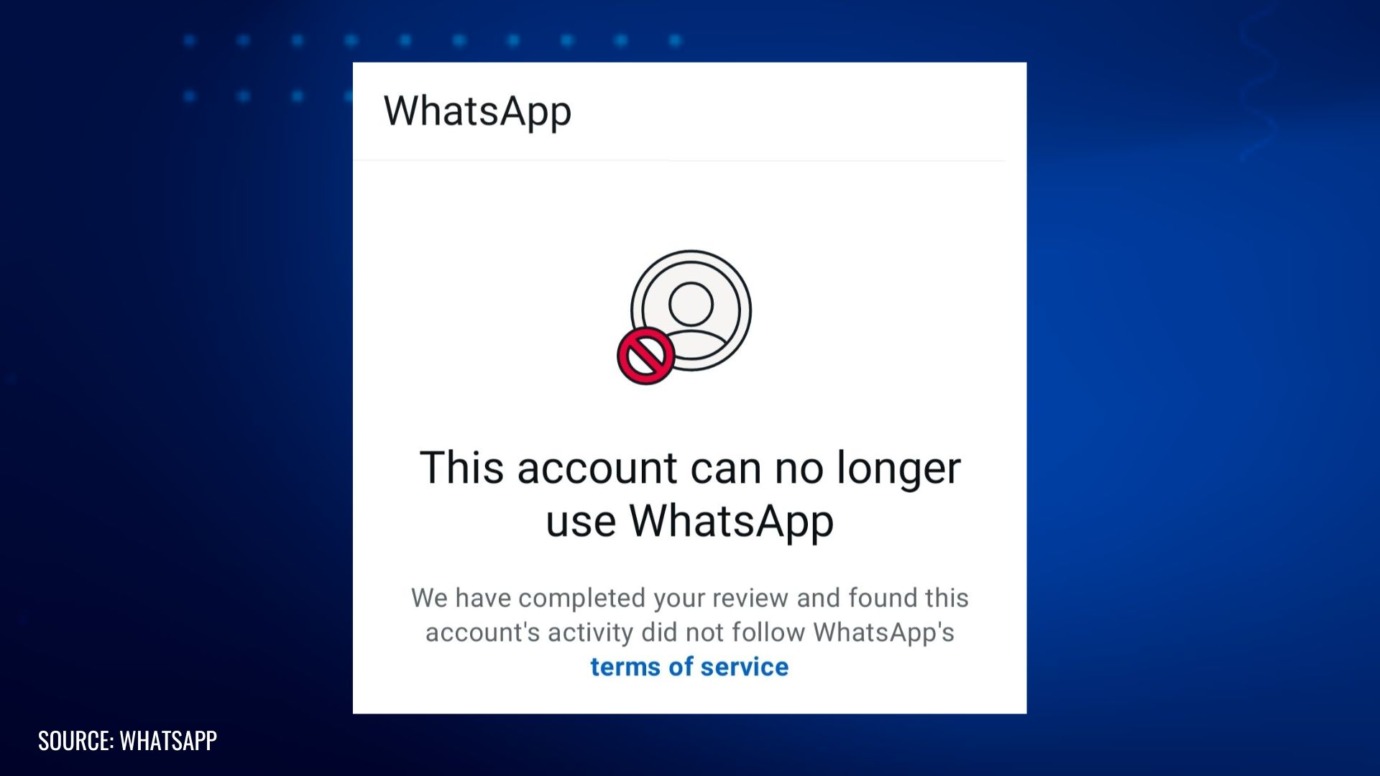
If you see a message specifically mentioning that your blocked WhatsApp account is due to spam, it means the platform’s automated systems have detected behaviour consistent with sending unsolicited messages. This is one of the most common reasons for account suspension.
This flag is often triggered when an account sends a large volume of identical or similar messages to users who have not opted in to receive them. For businesses using WhatsApp for marketing, this can happen unintentionally while trying to reach new customers. WhatsApp’s priority is protecting its users from unwanted communication, so its anti-spam measures are quite aggressive.
Temporary vs. Permanent WhatsApp Blocks: What’s the Difference?
Not all blocks are created equal. It’s important to identify which type of block you are facing, as the recovery process differs.
- Temporary Block: This is a warning. It usually comes with a countdown timer, indicating when you can access your account again. Temporary blocks are often issued for minor infractions or first-time offences, such as using an unsupported app. Once the timer runs out, your access is typically restored automatically.
- Permanent Block: This is far more serious. A permanent ban means you can no longer use that phone number on WhatsApp. This action is reserved for repeated violations or severe breaches of the Terms of Service, such as engaging in illegal activities, sending malware, or persistent spamming. The message for a permanent block will state that your number is “banned from using WhatsApp.”
How Can I Get My WhatsApp Account Unblocked?
Discovering that your WhatsApp account is blocked can be stressful, but there are steps you can take to appeal the decision. Follow this process to request a review.
- Step 1: Identify the Type of Block
Look for a countdown timer on the screen. If you see one, it’s a temporary block. In this case, the best course of action is to wait for the timer to expire. If there is no timer, it is likely a permanent ban, and you’ll need to contact support.
- Step 2: Uninstall Unauthorized Apps
If you are using any third-party version of WhatsApp (like GB WhatsApp or WhatsApp Plus), uninstall it immediately. These apps are not secure and are a direct violation of WhatsApp’s terms. Download the official WhatsApp or WhatsApp Business app before proceeding.
- Step 3: Contact WhatsApp Support
When you open the blocked app, you should see an option to contact “Support.” Tap this to open a contact form. Alternatively, you can email them directly at [email protected].
- Step 4: Explain Your Situation Clearly
In your message, politely explain that your account has been blocked and you believe it was a mistake. Be concise and honest. Mention that you have read and will abide by the Terms of Service. If you are a business, briefly explain how you use the account to communicate with customers.
- Step 5: Provide Necessary Information
Include your full phone number in international format (e.g., +44 for the UK). If you are a business, it can be helpful to provide proof of legitimacy, such as your company name and website.
- Step 6: Wait Patiently for a Response
The review process can take anywhere from a few hours to several days. Sending multiple requests will not speed it up. Wait for their team to investigate and respond.
Reach out to us if you need help dealing with complex account issues and protecting your business communication channels. (Please note: We currently work with business accounts only.)
Can a Blocked WhatsApp Account Be Recovered?
Recovery is possible, but it is not guaranteed. The likelihood of getting your account back depends on the severity of the violation and whether it was a temporary or permanent ban.
For temporary blocks, recovery is almost certain—you just need to wait out the timer and stop the behaviour that caused the block.
For permanent blocks, recovery is more challenging. If your appeal successfully demonstrates that the block was an error or if you can convince the support team that the violation was unintentional and will not be repeated, they may restore your account. However, if the account was used for serious violations, such as scams or the spread of harmful content, recovery is highly unlikely.
How to Prevent Your WhatsApp Account From Being Blocked
Prevention is always better than a cure. To keep your account in good standing, follow these best practices:
- Adhere to the Terms of Service: Read and understand WhatsApp’s rules. Ignorance is not an excuse.
- Get Consent: Only message users who have opted in to receive communication from you. Never purchase contact lists.
- Avoid Bulk Messaging: Refrain from sending the same message to many users at once. Personalise your communication where possible.
- Use the Official WhatsApp Business App: This app is designed for commercial use and offers tools that help you communicate professionally without triggering spam filters.
- Encourage Users to Save Your Number: When a user saves your contact, it signals to WhatsApp that your messages are welcome.
- Don’t Overdo Promotions: Balance promotional content with valuable, helpful information to avoid being reported by users.
Common Mistakes That Lead to a Blocked WhatsApp Account
Many users get blocked by making simple, avoidable mistakes. Watch out for these common mistakes:
- Sending messages to a large list of unknown contacts.
- A sudden, massive increase in the number of messages you send.
- Creating groups with people who have not consented to be added.
- Sharing links that are flagged as malicious or spammy.
- Using automation tools that are not approved by WhatsApp to send messages.
Why Is WhatsApp Blocking More Business Accounts?
As WhatsApp has grown into a powerful marketing tool, businesses have flocked to the platform to engage with customers. Unfortunately, some have brought aggressive marketing tactics with them, such as sending unsolicited promotional messages.
To protect the user experience and maintain its reputation as a personal messaging app, WhatsApp has intensified its efforts to combat commercial spam. This means business accounts are under greater scrutiny. Using the official WhatsApp Business Platform via an API is the recommended way for larger businesses to manage customer communication at scale while remaining compliant.
Get Expert Legal Support for Digital Communication Challenges
Dealing with a blocked WhatsApp account or confusing digital rules is stressful for any business or creator. Keeping your work safe and following the law shouldn’t be complicated.
At Cabilly & Co., we specialize in intellectual property protection and practical legal solutions for online businesses, content creators, and brands. Our team is up to date with the latest developments in digital platform compliance, including WhatsApp and other messaging apps, and can help you understand your rights, draft compliant business strategies, and resolve disputes that might threaten your business.
Whether you need guidance on appealing account restrictions, safeguarding your content and customer data, or developing risk-averse communication practices, our experts are here to support you every step of the way.
Contact us to discuss your needs and secure your business’s digital future.
Legal Disclaimer: The articles published on our platform are for informational purposes only and do not constitute legal advice in any form. They are not intended to be a substitute for professional legal counsel. For any legal matters, it is essential to consult with us or a qualified attorney who can provide advice tailored to your specific situation. Reliance on any information provided in these articles is solely at your own risk.

 Mar 30, 2026